
 Login
Login
WestFax API Call breakdown: Fax_SendFax
We breakdown the parameters needed for Fax_SendFax and let you know how to get started fast with our HIPAA Compliant Fax API

Getting Started With Fax_SendFax
Fax_SendFax is the WestFax API call that sends a fax: pass it your account credentials, a destination fax number, and one or more files, and it queues the document for transmission and returns a JobId you can use to track delivery. Below we break down the call's parameters using our API documentation's Postman collection, which you can import into Postman and prototype against without writing any code first. Fields may be optional or required, and some fields have iterating values (Files0...999) where you can pass multiple values. We love Postman for prototyping but don't recommend relying on their auto-generated code samples — we've seen issues with them on some platforms.
We expect you to have some level of knowledge of API development with Restful APIs.
If you don't we suggest these great courses on udemy.com.
Call Parameters Explained
Let's look at the Call in the Postman collection and we'll detail each parameter below this image:
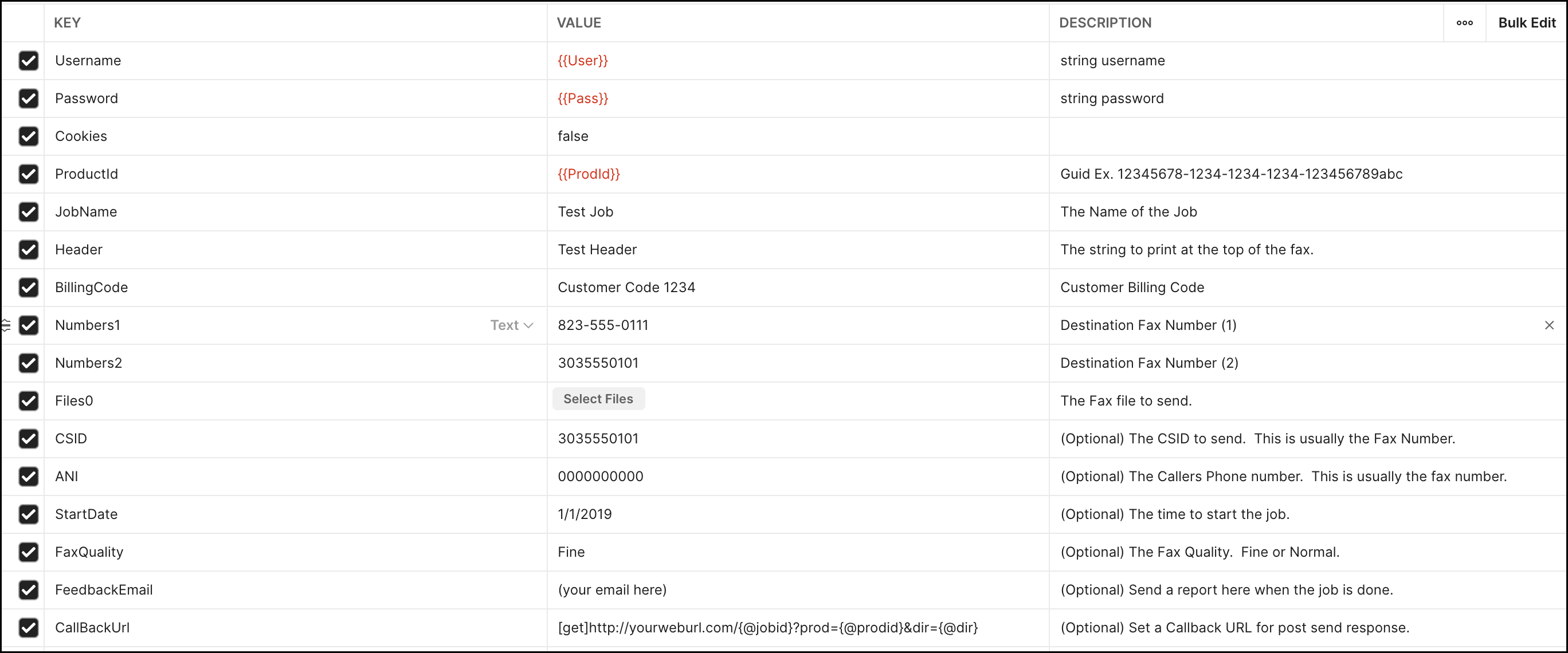
Call parameters details:
- Username
-Required- This is your WestFax Username - Password
-Required- This is your WestFax Password - Cookies
-Optional- You can disregard this field - ProductId
-Required- This is your Fax line's ProductId / APIKey - JobName
-Required- Choose a job name. Doesn't show up on the fax but will be available in reporting - Header
-Required- Header that goes on the document top middle. If you want to disable the header contact WestFax Support. - BillingCode
-Required- Enter any value here. For reporting purposes - Numbers1
-Required- This is the Fax Number you are calling. ###-###-#### format - Numbers2
-Optional- You can add more numbers by iterating on this value Numbers2...999 - Files0
-Required- This is the file you are faxing. You can also iterate this value to add more files (i.e. Files1...999) - CSID
-Optional- This is the CallerID that the receiving fax machine will see. Use your number. - ANI
-Required- This should be your fax number in format: ########## - StartDate
-Required- If you want the fax to go now enter 1/1/1999 or any date before now. You can schedule a fax for later by putting in a MM/DD/YYYY HH:MM:SS UTC timestamp - FaxQuality
-Optional- Fine or Normal. Defaults to Normal - FeedbackEmail
-Optional- The email address that gets the receipt email. - CallBackUrl
-Optional- This is the web callback URL WestFax will POST a status update to once the fax completes. See our Fax API overview for more on webhooks.
Getting Support
This should help you understand Fax_SendFax. If you need assistance please contact us using the "Need Support" button on the bottom left.