
 Login
Login
New Options for WestFax Email Receipts
There are now more Email to Fax feedback options. Let's go over them.

New Email to Fax Feedback Options
WestFax’s Email to Fax feedback reports now support two new options: attaching a thumbnail of the fax’s first page to the receipt, and sending feedback only when a fax fails. Feedback reports are the emails you receive after sending a fax from an email address; previously, you could only choose "Yes" for a standard receipt on every fax or "No" to suppress receipts entirely. The two new settings give you a middle ground — visual confirmation of what was sent, or a quieter inbox that only flags the faxes that need your attention. You can turn either one on for any user from the home portal’s Fax to Email Settings.
Where to Configure Feedback Settings
To set the new options login into the home portal. Click on My Account > then Fax to Email Settings > Allowed Email to Fax Users. You will see a list all users who are allowed sending faxes via email. Double click a user to edit, or add a new user and you'll be able to select the new feedback options.
There are 2 additional options:
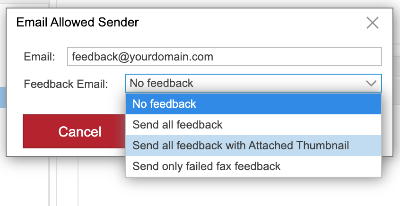
Lets review all the options:
Every Feedback Report Option Explained
- No Feedback
You won't get any feedback after you send your Email to Fax. To see the status you will need to view the fax in the outbox of the home portal. - Send all feedback
You will receive the standard WestFax feedback report with the completion time, page count and result. - Send all feedback with Attached Thumbnail (NEW)
You will receive the same report as above as well as an attached thumbnail of the first page of the fax. In most cases, this is the cover sheet so you can see what you sent and to whom in a visual manner. - Send only failed fax feedback (NEW)
You will receive the report only if the fax fails, which is rare. It will look the same but will have the failed status in the details section. You will no longer get successful send reports.
Changing Settings and Getting Help
All these settings can be changed on the home portal. You may need to contact your fax administrator to make this change.
If you have any questions email us and we'll get you squared away!